
Introduction
Let me guess… by the end of your workday, your wrist feels sore, stiff, or just plain tired?
Yeah, you’re not alone.
For a lot of professionals who spend hours in front of a computer, that nagging discomfort slowly becomes part of the routine. At first, it’s easy to ignore. But over time? It can turn into something much more serious.
Here’s the kicker: it’s usually not your workload causing the issue—it’s your setup.
More specifically… your mouse.
In this guide, we’ll break down why traditional mice can mess with your wrist, how an ergonomic mouse changes the game, and which option is actually worth your money.
Why Traditional Mice Can Cause Wrist Pain
Most standard mice are designed with simplicity in mind—not ergonomics.
When you use a regular mouse, your hand is forced into a flat, palm-down position. That might not sound like a big deal, but it twists your forearm and puts constant pressure on your wrist.
Over time, that can lead to:
- Repetitive Strain Injury (RSI)
- Carpal tunnel syndrome
- Tendon inflammation
- Numbness or tingling in your fingers
According to workplace ergonomics research (like studies from OSHA), poor desk setup is one of the leading causes of work-related discomfort and injury.
So yeah… this isn’t something to brush off.
What Is an Ergonomic Mouse?
An ergonomic mouse is designed to keep your hand in a more natural position—similar to a handshake.
Instead of twisting your wrist downward, your hand stays slightly vertical. That small change makes a huge difference.
Here’s what that means for you:
- Less strain on your wrist
- Better arm alignment
- More comfort during long work sessions
Simple shift. Big impact.
Ergonomic Mouse vs Traditional Mouse
Let’s keep it real and compare:
| Feature | Traditional Mouse | Ergonomic Mouse |
|---|---|---|
| Hand position | Flat (unnatural) | Natural (angled) |
| Long-term comfort | Low | High |
| Injury risk | Higher | Reduced |
| Learning curve | None | A few days |
At first, an ergonomic mouse might feel a bit unusual. But give it a few days—and going back will feel weird.
Real Benefits for Computer Professionals
If your job involves 6–10 hours a day on a computer, switching to an ergonomic mouse isn’t just a “nice upgrade”—it’s a smart move.
✔️ Immediate Comfort Improvement
Many users report less strain within just a few days.
✔️ Increased Productivity
Less discomfort means fewer distractions—and more focus.
✔️ Injury Prevention
You’re reducing the risk of long-term damage before it starts.
✔️ Better Overall Posture
Your wrist, arm, and even shoulder benefit from the change.
Best Budget-Friendly Option: TECKNET Ergonomic Mouse
Alright, let’s talk about a solid pick that balances performance and price.
👉 TECKNET Ergonomic Mouse (Wireless Vertical)
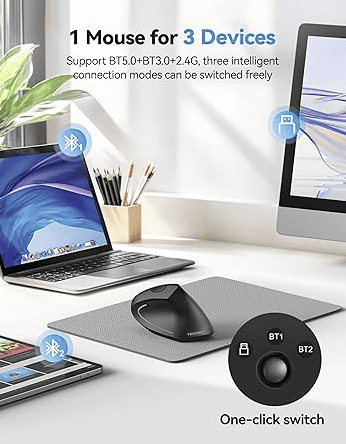
- Dual connectivity: Bluetooth + 2.4G wireless
- Adjustable DPI levels (up to 6 settings)
- Comfortable vertical design
- Compatible with Windows, Mac, iPad
- Highly rated by users
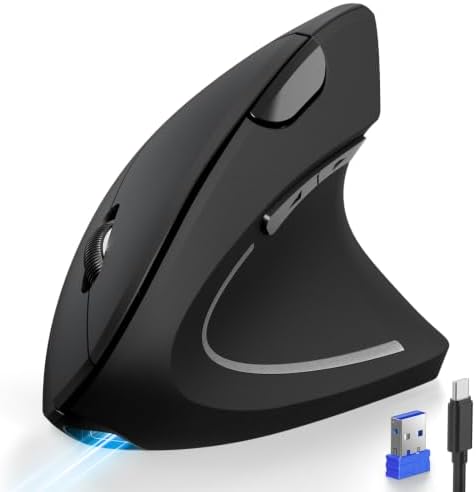
- USB A + BLUETOOTH MULTIDEVICE MOPS:Ergonomic mouse with 3 connection modes (BT5.0 + BT3.0 + 2.4 GHz). Easily switch betw…
- Precise control: The Bluetooth mouse uses 4800/3200/2400/1600/1200/800 DPI resolution optical tracking technology to pro…
- Rechargeable and Energy Efficient: This vertical wireless mouse has a Type-C cable and can last for 1-2 months of intens…
If you’re already feeling wrist discomfort—or want to prevent it before it starts—waiting isn’t the best strategy.
👉 Check the latest price and real user reviews on Amazon now:
💬 Quick tip: products like this often fluctuate in price and availability, so it’s worth checking while it’s still in stock.
Is an Ergonomic Mouse Actually Worth It?
Short answer? Yes.
Long answer? It depends on how much you value your comfort and long-term health.
If you barely use a computer, you might not notice a big difference.
But if your daily routine revolves around a screen… ignoring ergonomics can catch up with you.
What Are Users Saying?
Most reviews of ergonomic mice follow a similar pattern:
- Feels strange at first
- Quick adjustment period
- Noticeable improvement in comfort
That’s because your muscles are adapting to a more natural position.
Extra Tips to Improve Your Workspace Ergonomics
An ergonomic mouse is a great start—but don’t stop there.
Combine it with:
- Proper chair height
- Monitor at eye level
- Regular breaks every hour
- Wrist support if needed
Want to dive deeper? Check out this official ergonomics guide:
👉 https://www.osha.gov/ergonomics
Frequently Asked Questions
Does an ergonomic mouse really work?
Yes—it helps reduce wrist strain and promotes a more natural hand position.
Is it hard to get used to?
It might feel different at first, but most people adjust within a few days.
Is it good for all types of work?
Absolutely—especially for professionals who spend long hours on a computer.
Can it replace medical treatment?
No. It helps prevent and reduce discomfort, but it’s not a substitute for medical advice.
🧾 Final Thoughts
Here’s the bottom line:
The issue isn’t working long hours on a computer—it’s doing it with the wrong tools.
Small upgrades can make a massive difference over time. And switching to an ergonomic mouse is one of the easiest wins.
If you’re aiming for less pain, better comfort, and improved productivity… this is a no-brainer.
👉 Ready to make the switch?
- USB A + BLUETOOTH MULTIDEVICE MOPS:Ergonomic mouse with 3 connection modes (BT5.0 + BT3.0 + 2.4 GHz). Easily switch betw…
- Precise control: The Bluetooth mouse uses 4800/3200/2400/1600/1200/800 DPI resolution optical tracking technology to pro…
- Rechargeable and Energy Efficient: This vertical wireless mouse has a Type-C cable and can last for 1-2 months of intens…