
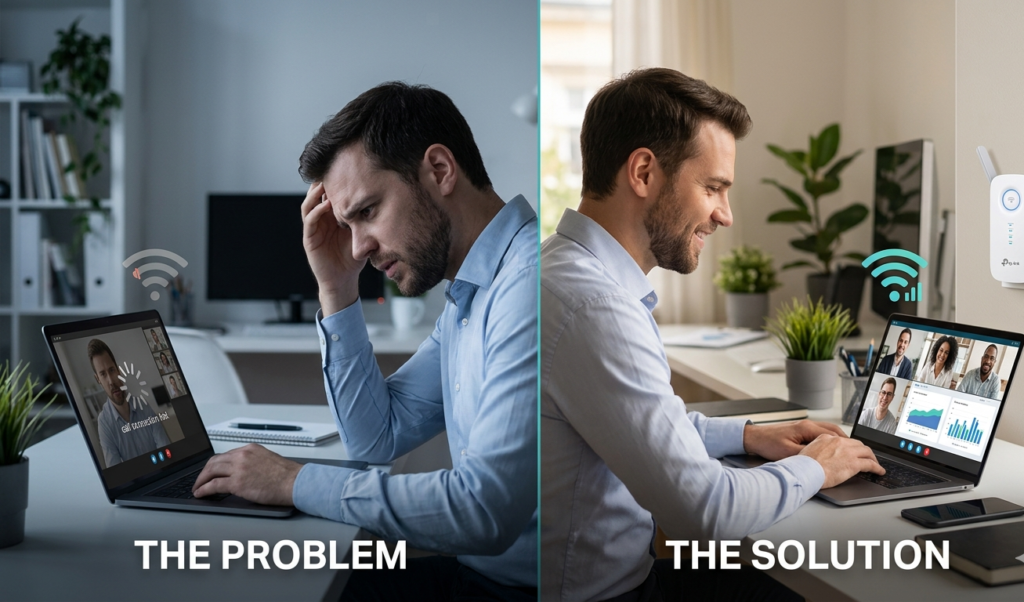
Introduction: The Problem You’re Probably Ignoring
You sit down to work, open your laptop, join a Zoom call… and suddenly—lag, freezing, poor audio, disconnected screen sharing.
Sound familiar?
Here’s the uncomfortable truth:
Your productivity might not be the problem—your WiFi is.
In today’s remote work, digital workspace, and cloud-based productivity environment, your internet connection is no longer just a utility. It’s your core infrastructure.
And yet, most professionals are working with unstable wireless networks, weak signals, and outdated setups without even realizing how much it’s costing them.
Why WiFi Quality Matters More Than Ever in Remote Work
Modern work is powered by:
- Cloud computing platforms
- Video conferencing tools (Zoom, Google Meet, Teams)
- Real-time collaboration software
- File uploads/downloads (often large data)
- Remote servers and VPN connections
All of this depends on one thing: a fast, stable, high-performance WiFi connection.
Even small disruptions can cause:
- Delayed communication
- Missed information in meetings
- Reduced workflow efficiency
- Frustration and mental fatigue
And over time, this adds up to lost productivity and even lost opportunities.
The Real Issue: It’s Not Your Internet Plan
Here’s where most people get it wrong.
They think:
“My internet is slow. I need to upgrade my plan.”
But in many cases, that’s NOT the issue.
The real problem is:
- Weak WiFi signal coverage
- Dead zones in your home office
- Signal interference (walls, furniture, devices)
- Router limitations
So even if you’re paying for high-speed internet, you’re not actually getting that performance where it matters most—your workspace.
How Poor WiFi Impacts Your Performance
Let’s break it down in practical terms.
When your WiFi is unstable, you experience:
🔹 Video Call Issues
Lag, freezing, audio cuts—this affects how others perceive your professionalism.
🔹 Slow File Transfers
Uploading projects or downloading data becomes painfully slow.
🔹 Interrupted Workflow
Constant reconnections break your focus and productivity flow.
🔹 Increased Stress
Yes—bad internet literally increases cognitive load and frustration.
In a competitive remote work environment, this can quietly damage your reputation, efficiency, and results.
The Hidden Cost of Ignoring This Problem
Think about it.
If you lose:
- 10–20 minutes per day due to connection issues
- Focus during important meetings
- Time waiting for files to load
Over a month, that’s hours of lost productivity.
Over a year?
It becomes a serious performance bottleneck.
And here’s the kicker:
Most professionals don’t even realize this is happening.
The Simple Solution: Upgrade Your WiFi Coverage
Now for the good news.
You don’t need to:
- Change providers
- Pay for a more expensive plan
- Rebuild your entire setup
What you need is:
Better WiFi signal distribution
That’s where a WiFi booster / repeater / range extender comes in.
Why a WiFi Booster Changes Everything
A high-performance WiFi booster:
- Extends your wireless coverage
- Eliminates dead zones
- Stabilizes your connection
- Improves speed consistency
In simple terms:
It brings your internet where you actually work.
Recommended Solution: TP-Link AC2600 WiFi Booster (RE650)
If you’re serious about fixing this issue, one of the most reliable options on the market is:
👉 TP-Link AC2600 WiFi Booster & Repeater (RE650)
Why this model stands out:
It’s not just another cheap extender—it’s built for high-performance environments, ideal for professionals working remotely.
Key features include:
- Dual Band 2600Mbps → fast and stable connections
- 4×4 MU-MIMO technology → supports multiple devices simultaneously
- Gigabit Ethernet port → ideal for wired connections when needed
- Access Point Mode → transforms wired network into wireless
- Wide coverage → perfect for larger homes or multi-room setups
This means:
✔ Smoother video calls
✔ Faster uploads/downloads
✔ Stable remote access
✔ Better overall workflow
Real Impact: What Changes After You Fix Your WiFi
Once your connection stabilizes, you’ll notice:
- Meetings run smoothly without interruptions
- Files transfer faster
- Applications respond instantly
- You stay focused longer
And most importantly:
You stop fighting your tools—and start working efficiently.
Pro Tip: Optimize Your Setup Even Further
To get the best results:
- Place your WiFi booster halfway between router and workspace
- Avoid physical obstructions
- Use the 5GHz band for speed-sensitive tasks
- Connect critical devices via Ethernet when possible
These small tweaks can maximize performance gains.
FAQ – Remote Work & WiFi Optimization
Do I really need a WiFi booster?
If you experience weak signal, slow speeds in certain rooms, or unstable calls—yes.
Will this improve video calls?
Absolutely. Stable bandwidth = better video and audio quality.
Is it better than upgrading my internet plan?
In many cases, yes. Coverage issues are often mistaken for speed issues.
Is TP-Link RE650 good for large homes?
Yes, it’s designed for extended coverage and multiple devices.
Final Thoughts: Stop Losing Productivity to Bad WiFi
Remote work demands reliable technology.
You invest in:
- Laptops
- Software
- Skills
But if your internet connection is unstable, all of that is compromised.
The reality is simple:
Your WiFi is either supporting your productivity—or silently sabotaging it.
Call to Action
If you’re tired of dealing with slow speeds, dropped calls, and constant interruptions, it’s time to fix the root of the problem.
👉 Check out the TP-Link AC2600 WiFi Booster (RE650) here and upgrade your remote work setup today:

- 𝐔𝐥𝐭𝐢𝐦𝐚𝐭𝐞 𝐖𝐢𝐅𝐢 𝐄𝐱𝐭𝐞𝐧𝐬𝐢𝐨𝐧 – Boost your network with AC2600 dual-band speeds up to 2533 Mbps (1733 Mbps on 5 GHz and 800 Mb…
- 𝐐𝐮𝐚𝐝-𝐀𝐧𝐭𝐞𝐧𝐧𝐚 𝐃𝐞𝐬𝐢𝐠𝐧 – Features four high-performance external antennas to provide ultimate coverage and reliable connect…
- 𝐌𝐔-𝐌𝐈𝐌𝐎 𝐖𝐚𝐯𝐞 𝟐 & 𝐁𝐞𝐚𝐦𝐟𝐨𝐫𝐦𝐢𝐧𝐠 – MU-MIMO technology allows the RE650 to communicate with multiple devices simultaneously f…
Don’t let a weak signal limit your performance. Fix it once—and work at your full potential.