
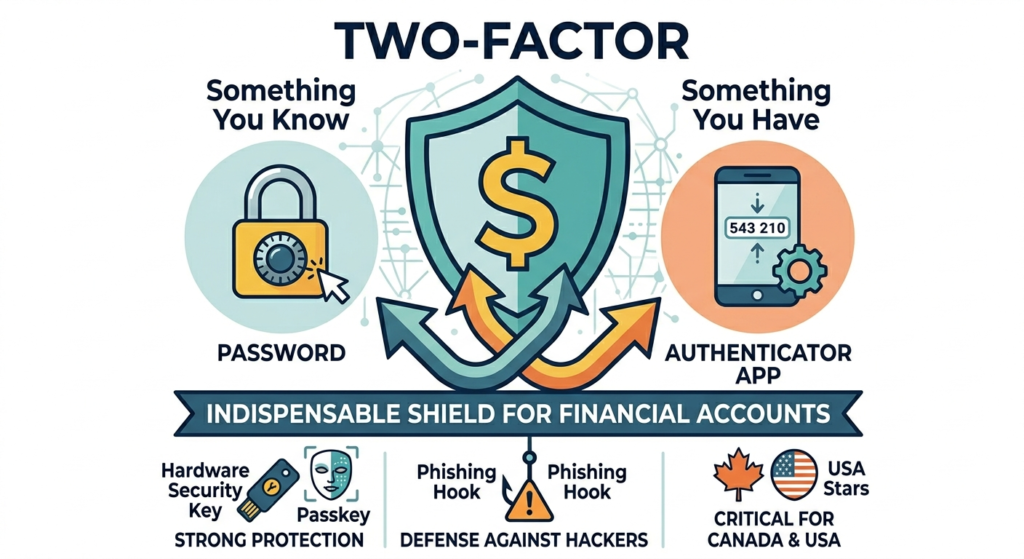
In an era where digital threats are constantly evolving, the security of your financial accounts is paramount. Passwords, once considered the sole guardian of your online identity, are no longer enough to withstand the sophisticated tactics of cybercriminals. This is where Two-Factor Authentication (2FA), also known as Multi-Factor Authentication (MFA), steps in as an indispensable shield. For individuals and investors in Canada and the United States, enabling 2FA on all financial accounts is not just a recommendation—it’s a critical necessity to protect your investments and personal data from digital threats. This comprehensive guide will delve into the benefits of 2FA, explore various authentication methods, provide a step-by-step setup guide, and highlight the latest trends for 2025-2026.
What is 2FA, and why is it Crucial for Financial Accounts?
Two-Factor Authentication adds an extra layer of security beyond just a password. It requires you to provide two different types of credentials before granting access to an account. These credentials typically fall into three categories:
1. Something you know: Your password.
2.Something you have: A physical device like your phone or a hardware security key.
3. Something you are: A biometric factor like a fingerprint or facial scan.
The Critical Benefits of 2FA for Financial Security:
•Enhanced Protection Against Hacking: Even if a cybercriminal manages to steal your password through phishing or data breaches, they cannot access your account without the second factor. This significantly reduces the risk of unauthorized access.
•Prevention of Identity Theft: Financial accounts are prime targets for identity thieves. 2FA acts as a robust barrier, safeguarding your personal and financial information from malicious actors.
•Reduced Fraud Risk: By making it harder for unauthorized users to log in, 2FA directly contributes to a reduction in financial fraud, protecting your investments and savings.
•Increased Peace of Mind: Knowing that your financial accounts are protected by a strong, multi-layered security system provides invaluable peace of mind in an increasingly risky digital landscape.
Understanding 2FA Methods: A Security Hierarchy
Not all 2FA methods offer the same level of security. It’s crucial to understand the differences to choose the most robust protection for your financial assets.
| 2FA Method | Description | Pros | Cons | Security Level |
| SMS/Email Codes | A code is sent to your registered phone number or email address. | Convenient, widely available, easy to set up. | Vulnerable to SIM swapping, phishing, and interception. Least secure. | Low |
| Authenticator Apps | Apps like Google Authenticator or Authy generate time-based one-time passwords (TOTP) on your device. | Requires device access, can be lost if the device is not backed up. | Requires device access, which can be lost if the device is not backed up. | Medium |
| Hardware Security Keys | Physical devices (e.g., YubiKey, Google Titan) that plug into your computer or connect wirelessly. | Newer technology is not universally supported yet. | Can be lost, initial cost, not all services support them. | High |
| Passkeys | A new standard for passwordless authentication, using cryptographic key pairs stored on your device. | Extremely secure (phishing-resistant), convenient (no password to remember), cross-device sync. | More secure than SMS (not tied to phone number), works offline, and is relatively easy to use. | High |
Source: LoginRadius, PCMag, Rublon
While SMS-based 2FA is better than no 2FA, it is the least secure option due to vulnerabilities like SIM swapping, where criminals trick mobile carriers into transferring your phone number to their device. Authenticator apps offer a significant upgrade, but hardware security keys and the emerging passkeys provide the strongest, most phishing-resistant protection available.
A Step-by-Step Guide to Setting Up 2FA (General Steps)
The exact steps may vary slightly depending on the financial institution or platform, but the general process for enabling 2FA is as follows:
1.Log In to Your Account: Access your financial account (bank, brokerage, crypto exchange, fintech app) using your username and password.
2. Navigate to Security Settings: Look for sections like “Security,” “Privacy,” “Account Settings,” or “Profile.” This is usually found in the main menu or dashboard.
3. Find Two-Factor Authentication (2FA) Option: Locate the setting for “Two-Factor Authentication,” “Multi-Factor Authentication (MFA),” or “Login Verification.”
4. Choose Your Preferred Method: Select the 2FA method you wish to use. Prioritize authenticator apps or hardware security keys over SMS whenever possible.
5. Follow On-Screen Prompts:
•For Authenticator Apps: The platform will typically display a QR code. Open your authenticator app, select “Add Account” (or similar), and scan the QR code. The app will then generate a 6-digit code. Enter this code back into the financial platform to verify.
•For Hardware Security Keys: You will be prompted to insert or tap your security key. Follow the instructions to register the key with your account.
•For SMS/Email: Enter your phone number or email address, and a code will be sent to you. Enter this code to verify.
6. Save Backup Codes: Most platforms will provide a set of one-time backup codes. It is critical to save these codes in a secure, offline location (e.g., a password manager, encrypted USB drive, or printed and stored in a safe). These codes are your lifeline if you lose access to your primary 2FA device.
7. Test Your Setup: After enabling 2FA, log out and then attempt to log back in to ensure it’s working correctly.
2FA in Action: Examples for Financial Platforms
Different financial platforms offer varying levels of 2FA support. Here’s what to expect:
•Traditional Banks (Canada & USA): Many traditional banks still default to SMS-based 2FA. However, a growing number are offering or encouraging the use of authenticator apps. Always check your bank’s security settings for stronger options.
•Fintech Apps (e.g., Wealthsimple, SoFi, Chime): Modern fintech platforms often provide robust 2FA options, including authenticator apps, and some are early adopters of passkeys. Their user-friendly interfaces typically make setup straightforward.
•Crypto Exchanges (e.g., Coinbase, Kraken, Binance): Due to the high-value and irreversible nature of crypto transactions, exchanges strongly recommend or even mandate 2FA. Many support hardware security keys for the highest level of protection.
The Future of Authentication: Passkeys and Beyond (2025-2026 Trends)
The authentication landscape is continuously evolving, with a significant shift towards more user-friendly and secure methods.
•Rise of Passkeys: Passkeys are poised to become the new standard for authentication, offering a passwordless experience that is inherently phishing-resistant. Major tech companies and financial institutions are rapidly adopting this technology, and by 2026, expect to see widespread support for passkeys across financial services.
•AI-Enhanced Security: AI is not only a tool for cybercriminals but also a powerful defense mechanism. AI-driven security systems will become more adept at detecting anomalous login attempts and identifying deepfake-based social engineering attacks, further strengthening 2FA.
•Improved Authenticator Apps: Authenticator apps are becoming more sophisticated, offering better backup and cross-platform synchronization features, making them more convenient and reliable.
Common Pitfalls to Avoid with 2FA
Even with 2FA enabled, certain mistakes can compromise your security:
•Using SMS as Your Only 2FA: As discussed, SMS is vulnerable. Upgrade to an authenticator app or hardware key whenever possible.
•Not Saving Backup Codes: Losing your 2FA device without backup codes can lock you out of your accounts indefinitely.
•Ignoring Security Alerts: Always take security notifications from your financial institutions seriously. Investigate any suspicious activity immediately.
•Falling for Phishing Scams: Even with 2FA, a sophisticated phishing attack can trick you into entering your 2FA code on a fake site. Always verify URLs and be wary of urgent requests.
•Sharing Your 2FA Codes: Never share your 2FA codes with anyone, even if they claim to be from your bank or a trusted service. Legitimate institutions will never ask for these codes.
Conclusion
In the dynamic digital landscape of 2025 and 2026, Two-Factor Authentication is no longer an optional security measure but a fundamental requirement for protecting your financial accounts. By understanding the various 2FA methods, prioritizing the most secure options like hardware security keys and passkeys, and diligently following setup and best practices, you can significantly fortify your defenses against cyber threats. For Canadian and American investors, embracing 2FA is a proactive step towards safeguarding your hard-earned money and personal data, ensuring a more secure and confident financial future.
References
[1] MidwestOne Bank. (n.d.). The Importance of Two-Factor Authentication for Cybersecurity.
[2] LoginRadius. (2025, December 17). Secure Type 2FA: Ranking the Strongest Authentication.
[3] PCMag. (2026, March 19). The Best Authenticator Apps We’ve Tested for 2026.
[4] Rublon. (n.d.). Multi-Factor Authentication (MFA/2FA) Methods.
[5] YouTube. (n.d.). Stop Hackers in Their Tracks: MFA & Passkeys Explained.
[6] Capital Credit Union. (2026, January 20). 2026 Guide to Cyber Security in Banking.