
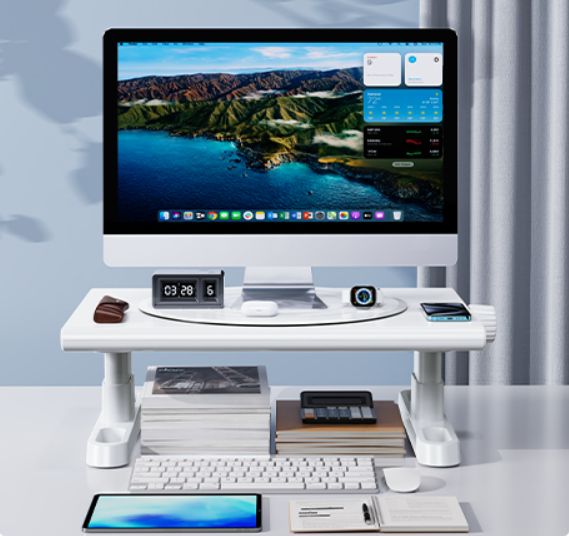
If you spend more than 4 hours a day in front of a computer, there’s a good chance your desk setup is silently destroying your posture, your focus, and, honestly, your patience too.
I didn’t realize how much my workspace was affecting my productivity until I made one ridiculously simple change: I added a rotating adjustable monitor stand to my desk.
And no — this isn’t one of those “you NEED this gadget NOW!!!” posts.
I’m writing this because after testing keyboards, monitor arms, standing desks, cable organizers, laptop risers, and every productivity accessory imaginable, I found that one of the cheapest upgrades ended up delivering one of the biggest improvements.
The product I tested was the:
Monitor Stand Riser for Desk – 360° Rotating Freely, Height Adjustable by Knob (White)
And surprisingly… it solved several problems at once.
The Problem Most Home Offices Have (But Nobody Talks About)
Modern remote work setups look aesthetic on Instagram.
But real desks?
They’re usually a mess of:
- monitors sitting too low
- neck pain after long coding sessions
- poor posture
- awkward webcam angles during meetings
- printers taking unnecessary space
- laptops overheating
- constant desk clutter
I work long hours in tech, and over time, I started noticing:
- shoulder tension
- neck stiffness
- fatigue earlier in the day
- constantly adjusting my sitting position
At first, I thought I needed a new chair.
Then I thought maybe I needed a standing desk.
But the truth was simpler:
My monitor height was completely wrong.
Why Monitor Height Matters More Than People Think
Most people place monitors directly on the desk surface.
That forces your neck into a slight downward angle for hours every day.
Over time, that creates:
- poor spinal alignment
- neck strain
- shoulder pressure
- wrist discomfort
- eye fatigue
An ergonomic monitor position should place the top portion of your screen roughly at eye level.
That’s exactly where a good monitor riser changes everything.
What Makes This Monitor Stand Different?
There are thousands of monitor risers online.
Most are:
- fixed height
- bulky
- ugly
- unstable
- impossible to adjust properly
What caught my attention with this model was the combination of features that actually make sense in real-world daily use.
1. 360° Free Rotation
This sounds like a small detail… until you actually use it.
Being able to rotate the stand freely makes it incredibly useful for:
- dual monitor setups
- collaborative work
- content creation
- video editing
- coding
- streaming setups
I found myself constantly adjusting the angle depending on the task.
That flexibility surprisingly improves comfort more than expected.
2. Adjustable Height with Knob Control
This is probably the biggest advantage.
Instead of using books, random boxes, or fixed risers, this stand lets you fine-tune the exact height you want.
The adjustable range (around 4.4 to 5.8 inches) sounds small on paper, but in practice it’s enough to dramatically improve posture.
The knob adjustment also feels much more stable than cheap snap-lock systems.
If you’ve ever had a wobbly monitor setup, you know how annoying that can be.
3. Minimalist Clean Design
One thing I genuinely liked:
It doesn’t scream “office equipment.”
The white minimalist aesthetic blends extremely well with:
- modern home offices
- gaming desks
- Apple setups
- clean workspace designs
- Scandinavian-style interiors
It actually made my desk feel cleaner and more organized instantly.
And yes — aesthetics matter more than people admit.
A cleaner workspace genuinely affects focus and motivation.
Unexpected Benefits I Didn’t Expect
This is where the product surprised me most.
Better Video Call Angles
Once the monitor was elevated properly:
- webcam framing improved
- Eye contact felt more natural
- Posture during meetings improved automatically
This matters a lot if you:
- work remotely
- attend Zoom/Teams meetings
- do interviews
- create content
- stream online
More Desk Space
The stand created usable space underneath the monitor.
That became perfect for:
- notebooks
- keyboards
- docking stations
- small accessories
- cable management
It made my desk feel significantly less cluttered.
Better Laptop Cooling
I also tested it with a laptop setup.
Because the device sits elevated, airflow improves naturally underneath.
That means:
- less heat buildup
- quieter fans
- more comfortable typing angles
For developers, designers, editors, or anyone running heavy workloads, this is actually useful.
Who This Monitor Stand Is Actually Good For?
Honestly?
Probably more people than you’d think.
Great for:
- remote workers
- programmers
- students
- gamers
- designers
- content creators
- office workers
- people with neck pain from desk work
It also works surprisingly well for:
- printers
- TVs
- laptops
- compact workstations
Is It Better Than a Monitor Arm?
This is the obvious question.
And the answer depends on your setup.
Monitor arms are great if:
- You want extreme flexibility
- You use ultrawide monitors
- You frequently reposition screens
- You have a heavy professional setup
BUT…
They’re also:
- more expensive
- harder to install
- visually cluttered sometimes
- dependent on desk compatibility
A riser like this gives you:
- simplicity
- stability
- cleaner aesthetics
- easier installation
- lower cost
For many people, that’s actually the smarter choice.
The Productivity Effect Nobody Mentions
This surprised me the most.
Once my monitor height was fixed:
- I felt less physically tired
- I stopped constantly adjusting my posture
- Focus sessions became longer
- Desk organization improved
- The workspace felt more intentional
Small ergonomic improvements compound over time.
People often chase productivity apps while ignoring the physical environment they spend 8–10 hours inside every day.
That’s backwards.
Things I Didn’t Like
To keep this honest, there are a few things worth mentioning.
It’s not ideal for extremely heavy monitors
If you have:
- giant ultrawides
- very heavy professional displays
- complex multi-monitor rigs
You may still prefer a premium monitor arm.
Height range is moderate
The adjustment range works well for most setups, but very tall users might want slightly more elevation depending on desk height.
Final Verdict: Is It Worth Buying?
For the price?
Absolutely.
This is one of those rare desk accessories that:
- improves ergonomics
- improves aesthetics
- improves organization
- improves comfort
- requires almost zero setup
And unlike trendy productivity gadgets, you actually notice the difference immediately.
If your desk setup feels uncomfortable lately, this is honestly one of the easiest upgrades you can make without rebuilding your entire office.
You can check the exact model here if you want to see the specs, dimensions, and current pricing:
👉 Monitor Stand Riser for Desk – 360° Rotating Adjustable Ergonomic Stand

- 【360°Rotate and Adjust Screen Orientation Easily】Different from other ordinary monitor stands, this monitor stand can ro…
- 【4.4-5.8 Inch Height Adjustable, Ergonomic Design】 Without moving the monitor and the monitor stand, this monitor riser …
- 【Ultra Strong Weight Capacity, Wide Range of Application】Our monitor stand is made of thick ABS material, which can easi…
And if you already spend most of your day at a desk, improving ergonomics is one of the few purchases that affects your body, productivity, and comfort every single day.